Love This Blog? Sign Up for Our Newsletter for More
SignupNo items found.


PhoneBurner’s SMS tools can help outbound teams add high-engagement texting to their workflow when the program follows certain rules and best practices. This article explains how A2P 10DLC registration works, why direct and documented consent is vital for outbound teams, and which SMS practices help protect deliverability and number reputation. It also shows how PhoneBurner supports responsible and effective texting through registration guidance, usage tracking, opt-out enforcement, and integrated sending tools.
Text messaging is one of the highest-engagement channels available to outbound teams. When it’s done right, SMS can meaningfully strengthen the relationship between a rep and a contact in ways that provide meaningful support for outbound dialing campaigns.
But the operative phrase is: when it’s done right.
SMS is also one of the most regulated and closely monitored outbound channels available to businesses today. The major U.S. mobile carriers have built an industry-wide system specifically designed to monitor business texting and protect consumers from nuisance activity.
Sending without proper registration, without documented consent, or without following message formatting guidelines can risk both the deliverability of your messages and the overall reputation of your associated outbound numbers.
PhoneBurner offers fully integrated SMS capabilities for outbound teams, but you’ll need to take a few important steps to access them and use them effectively. This guide gives you an overview of what you’ll need to do and why.
Years ago, sending business texts from a software application was relatively simple. You picked a number, drafted a message, and hit send. But that era is over.
In 2021, the major carriers formally adopted a framework called A2P 10DLC (Application-to-Person 10-Digit Long Code). Unlike P2P texting, messages sent person-to-person directly from a phone, A2P governs texts sent through software applications, like sales engagement platforms, CRMs, and dialers. This framework requires businesses to register before sending commercial SMS at scale through these tools.
Registration happens through The Campaign Registry (TCR), an industry-managed hub created specifically for this purpose. TCR acts as a central clearinghouse: once a business registers its brand and messaging campaigns, that approval is shared with major carriers, AT&T, Verizon, T-Mobile, and others, who use it to determine whether to deliver your messages.
The goal was straightforward: reduce spam and scam messages by creating accountability for who is texting, the content of their messages, and that proper consent is collected and maintained.
The result is a more trusted SMS ecosystem for consumers, and a more structured one for businesses. Unregistered messages are increasingly filtered or blocked entirely. Conversely, registered senders who exhibit appropriate texting behavior reap benefits such as:
For outbound teams, the path forward is clear: registration and proper outbound strategy aren’t optional extras. They’re the entry point.
It’s important to understand that there are different ways to send outbound texts. The two most common methods are:
Both types can support two-way messaging, but most sales reps use one-to-one messaging to facilitate more targeted and meaningful interactions with contacts. 10DLC is built specifically for these more personal conversations.
PhoneBurner’s SMS capabilities are available to Premium account holders who have completed the required registration steps. Here’s a quick overview of what that process looks like:
SMS messaging is included in PhoneBurner Premium accounts. It is not available on Standard or Professional accounts.
Before you can register for SMS, PhoneBurner requires you to complete a Business Verification Form that establishes your identity as a legitimate business entity. This includes confirming various details about your business, address, business registration, website, and operations.
The SMS Application Form collects the information PhoneBurner's Trust & Safety team needs to register your number and messaging campaign with the major carriers (Verizon, AT&T, and T-Mobile) through The Campaign Registry™. Our team reviews your submission first, and may require updates to your submission before it can be sent to carriers for approval.
There is a one-time, nonrefundable $50 application fee associated with this process. The fee covers both the industry-mandated registration cost and the one-on-one support PhoneBurner’s Trust & Safety team provides throughout the approval process.
Note: Paying the fee does not guarantee approval. Carriers make approval decisions based on their own criteria. PhoneBurner will advocate on your behalf, but cannot override carrier decisions.
Once your A2P 10DLC registration is approved, you’ll select a dedicated number or numbers for sending and receiving texts. This number will be associated with your registered campaign and should be treated as a business asset.
Before submitting your SMS application, make sure you meet all of the following requirements.
Sole proprietors are not eligible at this time due to carrier restrictions.
Your domain must match your business name or DBA linked to your EIN. The site must include a Privacy Policy and Terms and Conditions with a section specific to your SMS campaign, covering message frequency, opt-out instructions, and basic information about your texting practices.
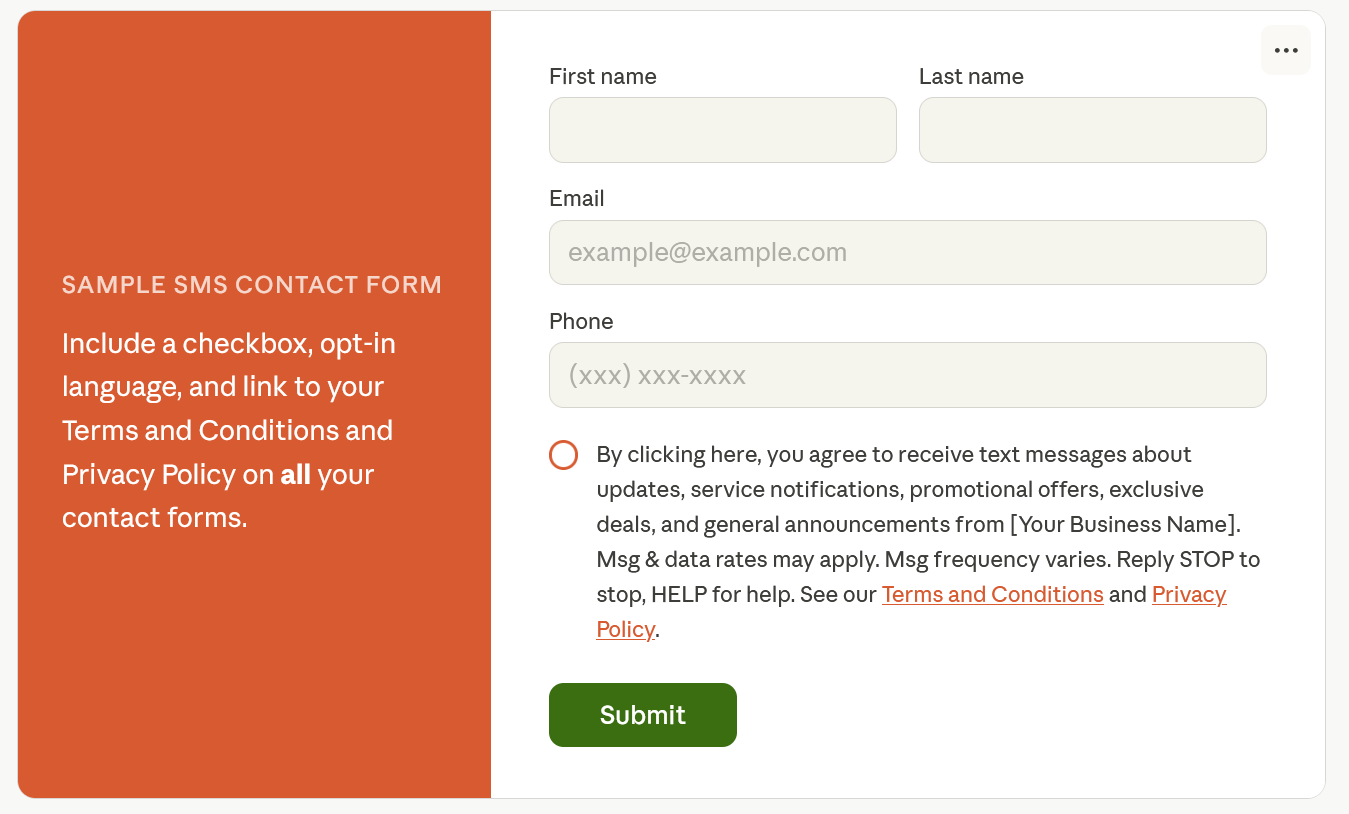
Carriers require proof that contacts have provided clear, written consent to receive text messages from your business. To demonstrate this, you'll need at least one contact form on your website that includes opt-in language specific to SMS, a link to your Privacy Policy and Terms and Conditions, and an unchecked checkbox for SMS consent that is separate from any other consents.
By clicking here, you agree to receive text messages about updates, service notifications, promotional offers, exclusive deals, and general announcements from [Your Business Name]. Msg & data rates may apply. Msg frequency varies. Reply STOP to stop, HELP for help. See our Terms and Conditions [link] and Privacy Policy [link].
You’ll need an approved business use case to text. Certain business types and message categories, such as gambling, cannabis, payday loans, and others are not permitted under carrier guidelines.
Once you’ve set up the tools to text contacts, you’ll need to keep your campaigns on the right side of carriers and analytics engines. This will determine whether your SMS program actually works.
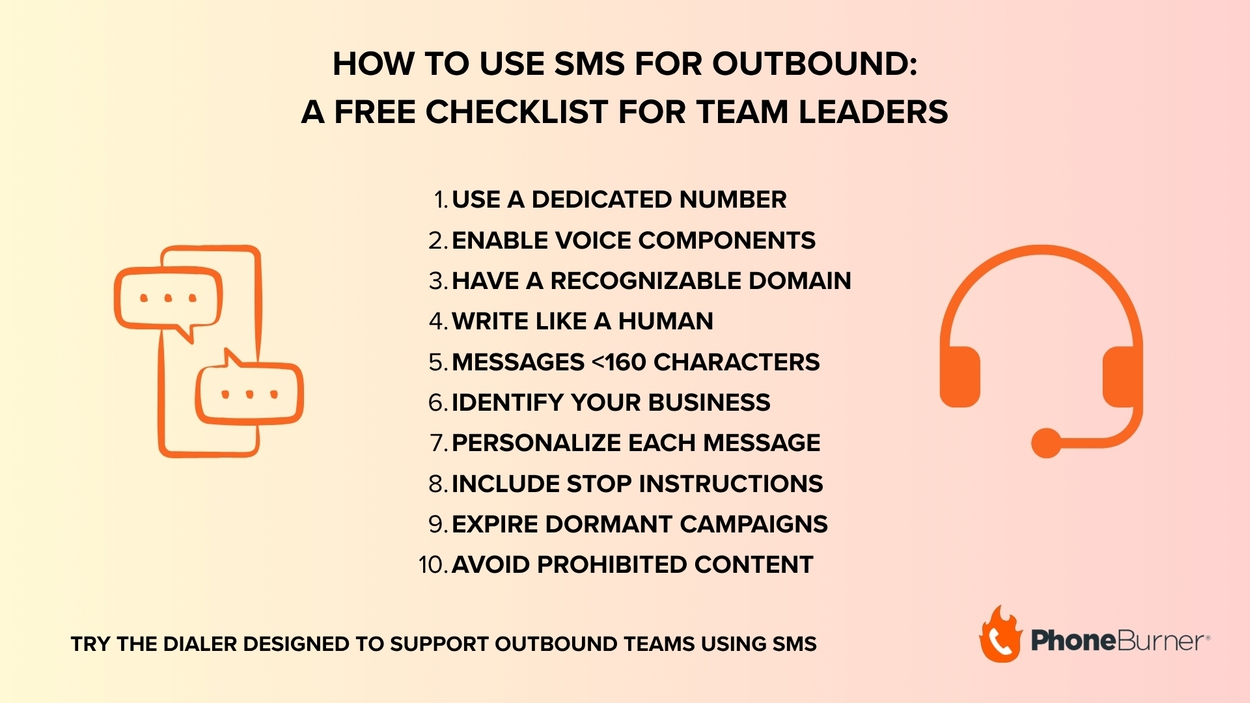
Below are ten guidelines we recommend for any team that uses SMS as an outbound channel, no matter what platform you opt to use.
Review them below, then try our free sales text message generator to experiment with different message formats and get ideas for your next campaign.
Consolidate your SMS traffic on a single dedicated number rather than rotating through multiple numbers for the same campaign. Using multiple numbers can make your outreach look like spam, even if your messages are entirely legitimate. Consistency builds recognition and trust.
If a recipient calls the number you’re texting from and hears “this number is not in service,” it can impact their trust and even result in complaints that can raise your spam flag risk. Make sure your number is enabled for voice, or at minimum configure a voicemail that identifies your business and provides a way for the caller to engage. This is a small step that meaningfully protects your number’s reputation.
When including links, use your own branded domain rather than public URL shorteners like Bitly. Carrier filters are specifically tuned to flag messages containing public shortener links because they’re a common tool for spammers and scammers. A full domain URL, or a short branded subdomain, keeps your messages looking professional and gets them through.
Unlike short codes and blast campaigns, 10DLC is built for one-to-one communication. That means your texts should read like they came from a person, not a marketing department.
Use natural language. Avoid awkward formatting, unusual capitalization, excessive punctuation, or intentionally misspelled words. Messages that look like they were written to evade filters often get caught by them. Write the way you’d write to a colleague.
A standard SMS segment is 160 characters (80 if you use emojis). Messages that spill into multiple segments increase costs and reduce readability. Brevity isn’t just efficient; it’s better for the recipient’s experience.
It’s normally a good idea to include your company name in the first message you send a contact. Recipients who can’t immediately identify who’s contacting them are far more likely to report the message as spam. Sender transparency is foundational to a trusted outbound program.
Texting through a platform makes it easy to scale outreach, but your contacts should never feel like they're on a list. Use merge fields like first name, company, or other relevant details to make every message feel like it was written specifically for them.
Every message should give recipients an easy way to opt out. Include messaging like “Reply STOP to end” at the end of messages so recipients can remove themselves from your list.
PhoneBurner handles this automatically. When a recipient replies with STOP, STOPALL, UNSUBSCRIBE, CANCEL, END, or QUIT, they are immediately added to your DNC list and can no longer receive texts from your account.
Related: A Comprehensive Guide to the Do-Not-Call Registry
If a messaging campaign is no longer active in the market, you are required to expire it. Leaving inactive campaigns registered but idle can create compliance and deliverability issues down the line.
Certain message types are blocked outright by carriers regardless of registration status. PhoneBurner’s Acceptable Use Policy for SMS identifies content categories that are never permitted. When in doubt, consult the policy and when something feels like it’s edging toward a gray area, treat it as red.
Understanding the rules is half the battle. Having a platform that helps your team follow them consistently at scale is the other half. PhoneBurner supports outbound teams using SMS in the following ways:
Every SMS-enabled PhoneBurner account includes 1,000 outbound messages per calendar month. Inbound messages are unlimited.
If you exceed your 1,000-message limit, overages are billed at $25 per additional 1,000 messages. To avoid a service interruption, charges are applied automatically when your balance reaches zero.
PhoneBurner gives you visibility into your usage in real time. A counter at the bottom right of the message window shows how many outbound messages you’ve sent out of your 1,000 monthly limit. Team administrators have access to an “SMS Usage” standard report under the My Team tab that displays counts of sent and received messages for every user on the team.
You’ll also receive a courtesy notification email when a user has 100 messages remaining, and again when the limit is reached and overage billing is triggered.
As noted above, PhoneBurner automatically prevents future SMS messages from being sent to contacts once they have replied with any recognized opt-out keyword and adds it to your individual DNC list. This feature is designed to keep your team responsible and help you avoid potential penalties due to accidents or outlying actions by agents that do not align with your outbound strategy. However, recipients can always re-subscribe by replying with START, YES, or UNSTOP.
Once approved, SMS is accessible from multiple places in the platform:
Check out this video to see how easy sending an SMS during a dial session with PhoneBurner is:
SMS is a powerful channel, but only when it’s built on a foundation of consent and consistency. Outbound teams that approach it correctly benefit from one of the highest-engagement tools available in modern sales. Those that don’t risk deliverability problems, carrier filtering, and flags attached to their outbound numbers.
PhoneBurner’s Trust & Safety team is available to guide you through every step of the registration and approval process. Once you’re set up, you’ll have the tools, monitoring, and opt-out infrastructure to run a compliant SMS program with confidence.
To apply, you need to have a valid EIN, a website you control and can update, written consent from the contacts you plan to text, and a use case that complies with carrier guidelines. PhoneBurner’s Business Verification Form and SMS Approval Form walk you through the documentation required for each.
Compliant SMS opt-in language must clearly identify your business, describe the type of messages the contact will receive, disclose that message and data rates may apply, state how frequently messages will be sent, and provide opt-out instructions. It must appear alongside an unchecked checkbox on any form where you collect phone numbers.
A standard example:
"By checking this box, you agree to receive text messages from [Your Business Name] about [updates / offers / appointment reminders — describe your use case]. Message and data rates may apply. Message frequency varies. Reply STOP to opt out or HELP for help. See our [Terms and Conditions] and [Privacy Policy]."
This language should appear on every contact form where a phone number is collected — not just one. Consent obtained through a third party, a purchased list, or a pre-checked box does not satisfy carrier requirements.
PhoneBurner automatically removes that contact from future SMS sends on your account and adds them to your individual DNC list. They can re-subscribe at any time by replying with START, YES, or UNSTOP. Beyond the keyword appearing in the message thread on the SMS tab, there is currently no separate flag in PhoneBurner that marks a contact as unsubscribed, so it’s worth training your team to recognize opt-out keywords if they’re reviewing message threads.
Standard SMS messages are segmented at 160 characters (80 characters if you use emojis in the message). Each segment counts as one outbound message toward your monthly 1,000-message limit. A message that runs to 320 characters counts as two. Keeping messages concise protects your budget, improves the recipient experience, and reduces the risk that a message gets clipped or distorted in delivery.
Not currently for outbound. While PhoneBurner’s messaging system can receive images sent inbound by contacts, outbound image (MMS) sending is not supported at this time. All outbound messages are text only.
You are required to notify all opted-in contacts before the transition occurs and obtain new opt-ins for the new number. Prior consent does not carry over. The process involves sending a final message from the old number disclosing the new number, the program name, opt-out language, and support contact info.
Within 24 hours, a second message from the new number must include the program name, opt-out instructions, support contact details, and message frequency disclosure. The old program must be fully discontinued once the transition is complete.
Team administrators have access to an “SMS Usage” standard report under the My Team tab in PhoneBurner. It displays current sent and received message counts for every user on your team. Individual users can also see their own usage via a counter in the message window. Notification emails are sent automatically when a user reaches 100 messages remaining and again when the limit is reached and overage billing is triggered.